 Omnimatch
 Choosing a model
On this page
Choose model rolesRun an LLM locallyUse Omnimatch modelsBring your own providerTest and save your modelsChoose where your LLMs run and who provides access to them. One connection is shared across your installation and can be changed later in System administration → Models.
Under Connection, choose Omnimatch Models, Bring your own API key or the advanced Custom endpoint route.
Choose model roles
Each connection starts with assignments for intelligent text, cheap text, intelligent vision and cheap vision. Expand Advanced model selection to change them. You can use the same model for several roles.
Run an LLM locally
Run tool-capable and image-capable models on the same machine or elsewhere on your private network. Choose Custom endpoint, select the API format, then enter its Endpoint URL, optional API key and model IDs. The endpoint must be reachable from the Omnimatch container.
For Ollama, choose OpenAI-compatible, use ollama as the key and enter the name of a model you have installed. A local LLM can support fully air-gapped operation and does not consume Omnimatch credit.
Use Omnimatch models
Choose models with provider zero data retention without managing a provider account or model server. Enter a product key with Omnimatch model access. Requests use your Omnimatch credit and require internet access.
Model requests still leave your infrastructure, so this option is not air-gapped. Expand Advanced model selection to change the four assignments.
Bring your own provider
Connect OpenAI or Anthropic using an account and API key your organisation controls. The official endpoint and four model assignments are preselected. The provider’s data-use and retention terms apply. Expand Advanced model selection to override a model ID.
Your provider bills you directly, and requests do not consume Omnimatch credit. Data retention depends on your agreement and configuration with that provider.
Test and save your models
Fill in the connection details shown for your selected source. Click Test connection to test each distinct model, including an image for vision assignments, then Save settings.
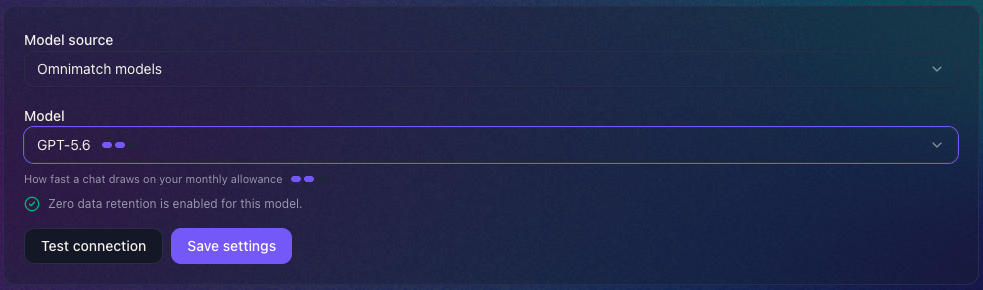
For Omnimatch models, the small bars show how quickly a model draws on your allowance. The panel also shows whether provider zero data retention is enabled for the selected model. This status applies to model processing, not other records or services.