 Omnimatch
 Features & licensing
On this page
See what’s includedStart without a product keyAdd people and agentsChoose sign-in and sharing optionsChoose your document providerAdministration included as standardRequest Omnimatch servicesActivate and review your featuresChange your licenceDiscuss your requirementsStart with the free single-user installation. Request the user limits, agent limits and optional capabilities your organisation needs.
See what’s included
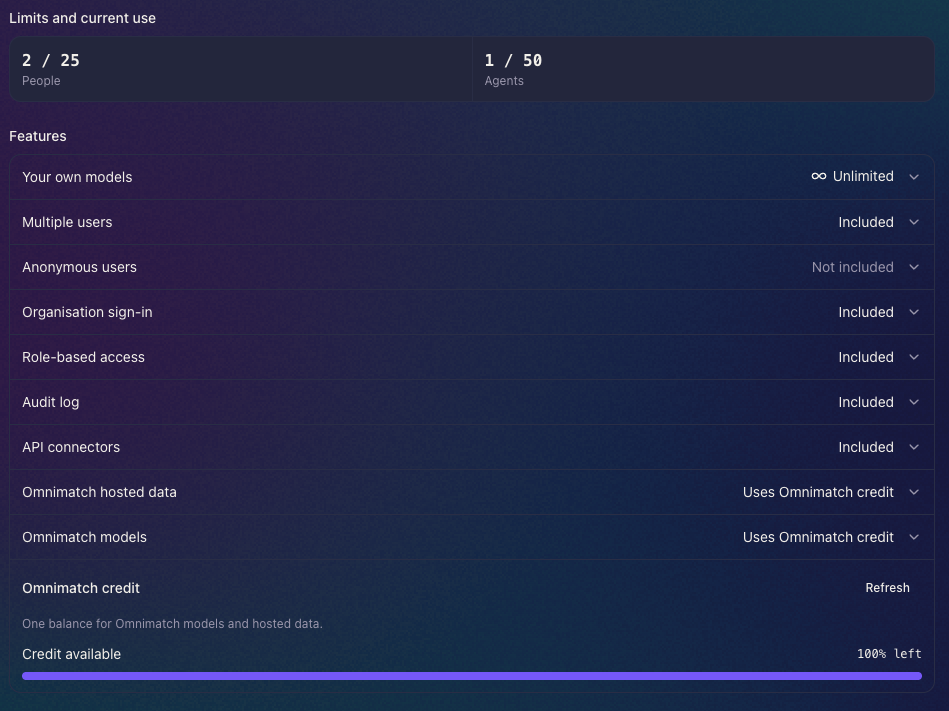
Open System administration to see your installation’s limits and current use. The features list shows what’s included, what isn’t and which services use Omnimatch credit. In this example, the installation is using 2 of its 25 people and 1 of its 50 agents.
Start without a product key
Community mode includes one signed-in user, one live agent, document knowledge, audit access, admin roles and approved API connectors. Connect a local model or your own provider account. Your own model usage has no Omnimatch token cap.
Add people and agents
Multiple users gives people their own accounts and enables team access. Your product key sets the number of named users and live agents your installation can have. Ask for limits that fit your team.
Choose sign-in and sharing options
- Organisation sign-in: connect your company’s OpenID Connect identity provider. An administrator must configure the connection.
- Anonymous users: allow visitors to chat with agents explicitly shared for access without sign-in. This is a separate option from named-user team access.
Anonymous visitors cannot manage agents and do not count as named seats. Network reachability still depends on your firewall and reverse proxy; an anonymous link is not automatically restricted to your internal network.
Choose your document provider
OneDrive and Google Drive are separate licence switches. Choose either, both or neither for your organisation. Only the licensed providers appear when creating an agent; a licensed provider still needs administrator configuration before accounts can connect.
These connections use your own provider applications and do not require Omnimatch hosted data or Omnimatch models. Follow the OneDrive setup guide or Google Drive setup guide. Existing keys without the provider permission need a replacement key.
Administration included as standard
Audit log, Role-based access and agent co-managers are included. Co-managers require more than one licensed person. Company sign-in groups can assign system administrator, agent administrator and auditor roles once SSO is configured. Community mode remains limited to its initial local administrator.
Request Omnimatch services
Omnimatch models
Use models provided through Omnimatch without managing a provider key or model server. This requires the corresponding product-key feature, service configuration and internet access.
Omnimatch hosted data
Enrich answers with the hosted data sources supported by your installation. This requires the corresponding feature and access to Omnimatch’s service. Confirm the datasets you need when requesting access.
These optional services share your Omnimatch usage balance. They are not part of air-gapped operation. Your own model or provider connection remains separate.
Activate and review your features
Ask Omnimatch for a product key with the capabilities and limits you need. Your administrator enters it in Admin → System administration, where the active features, limits and validity are shown. The key is verified locally and does not require an online activation call.
Optional features are enabled individually; having a key does not imply that all of them are included. An expired or invalid key returns the installation to Community limits, so arrange a replacement before expiry if your team relies on licensed access.
Change your licence
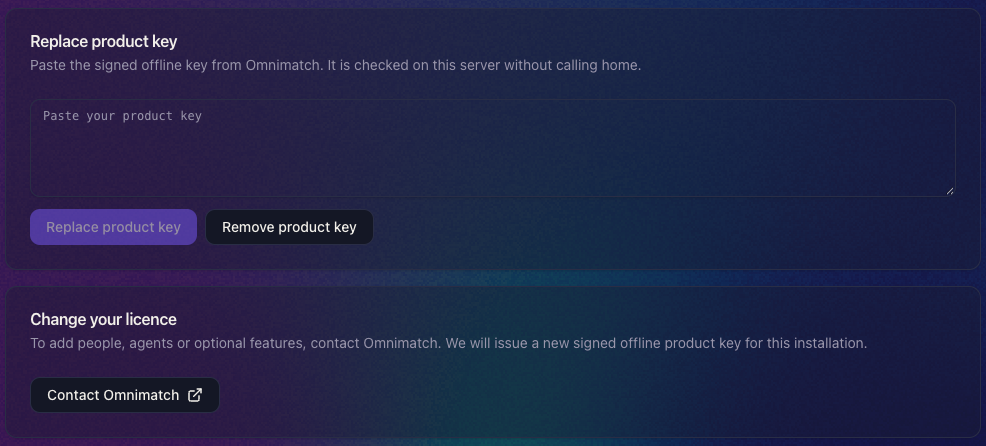
To add people, agents or optional features, contact Omnimatch. We’ll issue a new signed offline product key for your installation. Paste it into Replace product key and click the button to apply it. The key is checked on your server without calling home.
Discuss your requirements
Contact Omnimatch with your expected users and agents, sign-in requirements, required data sources and whether the installation must work without internet access.
Review On-premise limitations first. Hosted email, messaging and schedules are not unlocked by a product key in the current image.